



To every team that has engaged Fetcher thank you.
Today we're sharing that Fetcher is retiring its platform, and Juicebox will be helping our customers with the transition.
We believe Juicebox offers the best recruiting solution on the market for our customers, and we’re proud to have entered a strategic partnership with them to continue supporting our customers in the sourcing journey. As part of the transition, Juicebox has acquired assets of Fetcher, and our customers will have the option to move to Juicebox with an exclusive offer.
The Fetcher platform will stay live through October 16. We know two weeks is a short window, especially for teams with searches in progress, and we’re sorry for the rush. Our team will do the heavy lifting so there's no gap in your recruiting workflows.
The answers below cover what happens next, how to take your data with you, and how to get started on Juicebox.
Jump to a question
Transition
- What’s the timeline?
- What can I export, and how?
- How do I download project performance stats?
- Where is my contact history?
- What happens to outreach sequences that are running?
- What about my ATS and email integrations?
- What happens to my contract, prepaid leads or unused credits?
- Will I be billed again?
- Do I still need to pay outstanding invoices?
- Who do I contact after October 16?
Moving to Juicebox
- How do I get started?
- How long is the Juicebox offer valid?
- What if we already know Juicebox?
- Is my candidate data shared with Juicebox?
- Does my Fetcher data carry over?
- How do I import my contacts?
- How do my Fetcher workflows map to Juicebox?
- What are Juicebox agents?
- What’s new with Juicebox?
- How Can I Get More Information About Juicebox?
Transition FAQ
What’s the timeline?
- October 2: Customers to start receiving receive an emails from Chris and the Fetcher team with next steps and their Juicebox promotional offer.
- October 2 to 16: The Fetcher platform stays fully available. Request a full export at any time, and the Fetcher team will reach out to help with exports and answer questions.
- October 16: The Fetcher platform shuts down. This is the last day to request a full export. Requests received by October 16 will be fulfilled even if delivery falls after shutdown.
- November 19: Fetcher support stays available by email through this date, which is also when the exclusive Juicebox offer for Fetcher customers expires.
- After November 19: To protect candidate privacy, we will securely delete all remaining account data. Your data will not be transferred to anyone outside of Fetcher.
What can I export, and how?
You have two options.
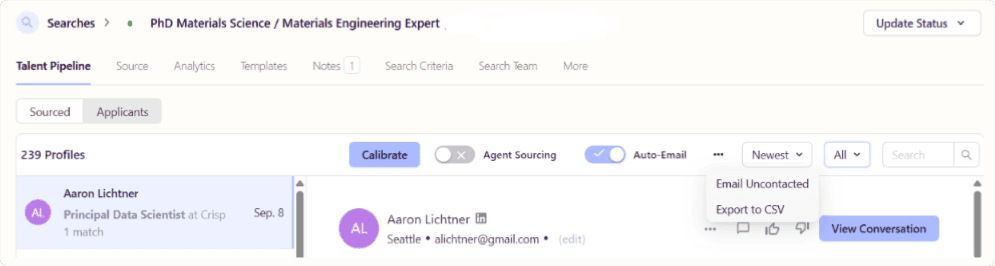
Self-serve CSV (available now through October 16). Download candidates for any position yourself, one position at a time. Open the position, go to Talent Pipeline, choose which candidates to include from the tab dropdown, then click the three-dot menu at the top right and select Export to CSV.
Full export (on request). Email support@fetcher.ai and we’ll prepare an export of [contents of the full export] across your account. We’ll send it within 3 business days of your request, so you don’t have to wait for the platform to close.
How do I download project performance stats?
Go to Dashboard, open the Projects section, and click the download icon.
Where is my outreach and contact history?
If you send outreach through a connected Gmail or Outlook account, your contact history is already in your own inbox and nothing needs to be exported to keep it. If you sent outreach through Fetcher’s own email sending, that history lives in Fetcher, and you can include it in your export before October 16.
What happens to outreach sequences that are running?
Sequences keep sending through October 16 and stop when the platform shuts down. What happens to replies depends on how it was sent:
- Through a connected Gmail or Outlook account: candidate replies keep arriving in your inbox after shutdown.
- Through Fetcher’s own email sending: replies won’t be received after October 16.
If you sent through Fetcher, we recommend pausing your sequences before the 16th and following up directly with anyone mid-sequence.
What about my ATS and email integrations?
We’ll disconnect every integration on our side at shutdown. For your own security, we also recommend removing access on your end: revoke Fetcher’s access in your Google or Microsoft account settings, and delete the API key you created for Fetcher in your ATS.
What happens to my contract, prepaid leads or unused credits?
Every account is different, so we’ll contact you individually to review yours.
Will I be billed again?
If you have a past-due invoice, you may still receive a bill for it. Otherwise, we don’t expect to bill you again.
Do I still need to pay outstanding invoices?
Yes, for services already delivered. You won’t be charged for services we don’t deliver.
Who do I contact after October 16?
You can keep reaching Fetcher support at support@fetcher.ai through November 19.
Moving to Juicebox
Juicebox is trusted by 5,000+ companies, from fast-growing startups to global enterprises, and we're excited to be working with them to help our customers through this transition.
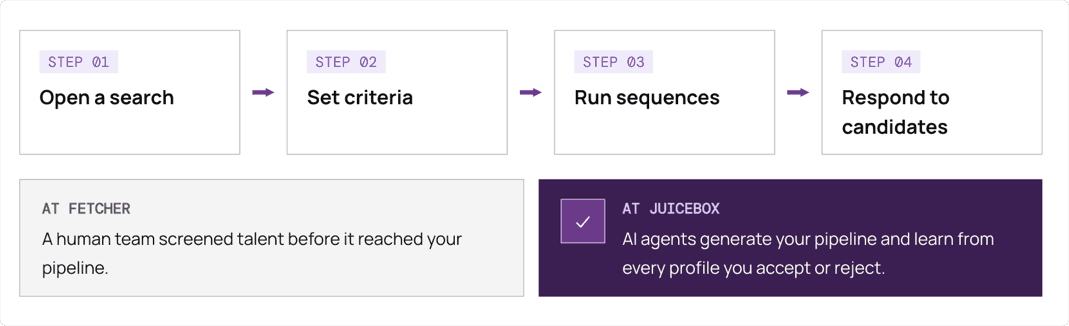
The core workflow will be familiar to you. You open a search, set criteria, run sequences and respond to candidates the same way in Juicebox as you did in Fetcher. At Fetcher, our team screened talent before they hit our pipeline. At Juicebox, you can either directly source or have automated agents help you generate pipelines. Juicebox offers the strongest version of this approach we've seen: it sources against your criteria, scores the results and adds them to your pipeline, and it learns from every profile you accept or reject.
How do I get started with Juicebox?
Everything you need is in the email Chris sent on October 2, including your Juicebox customer offer. If you can't find it, email support@fetcher.ai and we'll resend it.
How long is the Juicebox offer valid?
The Juicebox offer for Fetcher customers runs through Monday, November 19, a month past the Fetcher shutdown. You don’t have to decide before October 16, although starting earlier means you’ll avoid having a gap in your sourcing.
Does the offer apply if my team has already talked to Juicebox?
If your team hasn’t used Juicebox or taken a demo with them in the past six months, the offer applies to you.
Will my candidate data be shared with Juicebox?
No. Your candidate data is only shared with Juicebox if you become a Juicebox customer and choose to upload it yourself.
Does my Fetcher data carry over?
Not automatically. Your Fetcher positions, pipelines and notes stay with Fetcher until you export them, and your Juicebox account starts fresh. Export what you want to keep using the options above, then bring it into Juicebox.
How do I import my contacts?
[To Come] If you’d like help, the Juicebox team can walk you through it during onboarding.
How do my Fetcher workflows map to Juicebox?
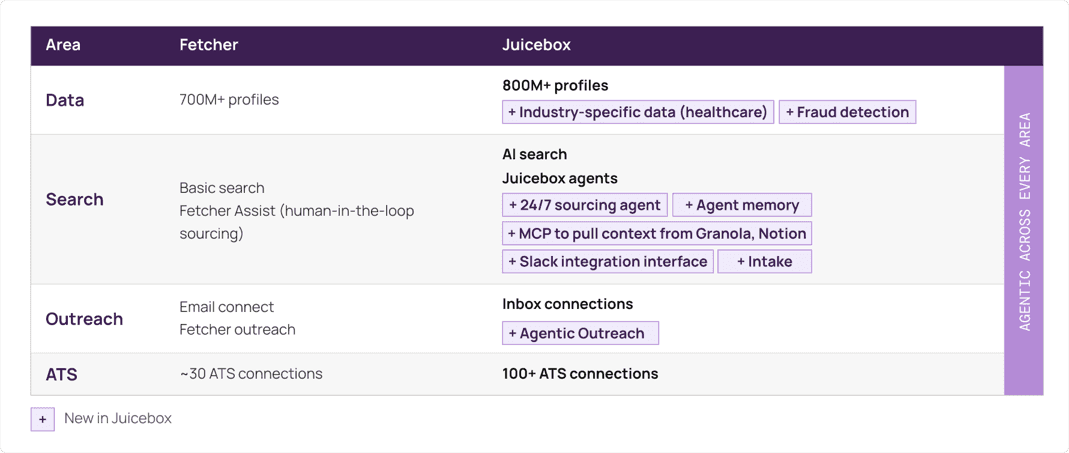
- Fetcher database → Juicebox database. Juicebox draws on more than 800 million profiles from a range of data sources, with a higher refresh rate than Fetcher.
- Fetcher sourcing → Juicebox search. If you run your own searches in Fetcher, Juicebox search takes over. It’s AI-powered: describe who you’re looking for from the job description, then refine with filters, and Juicebox builds and ranks the results.
- Fetcher-assist → Juicebox Agents. If you relied on Fetcher’s team to source for you, Juicebox’s Agents can take over that work 24/7 with enhanced memory and context. More on agents below.
- Fetcher ATS integration → Juicebox ATS integration. Import a job from your ATS to start a search, and save profiles back to it. Juicebox works with 50+ ATS platforms, including Ashby, Greenhouse, Lever, Workday and Bullhorn.
- Fetcher seats and teams → Juicebox seats and teams. You can still bring on hiring managers, share searches and collaborate as an organization.
What are Juicebox Agents?
Agents are the closest match to how Fetcher worked for teams that relied on our sourcing team, and they scale with your hiring. Like our human-driven model, an agent can be your sourcing assistant, adding profiles to your talent pipeline for you to review, and it learns from your guidance as you go.
You decide how much to automate. Some teams review every profile before any outreach; others let the agent run on its own once it’s calibrated.
What’s new with Juicebox?
Beyond agents, Fetcher customers get several features we didn’t offer:
- Intake: An optional feature that records and transcribes your kickoff call with the hiring manager, shows talent pool insights while you talk, and turns the conversation into search criteria.
- CRM integrations: connect Salesforce, HubSpot or Affinity alongside your ATS.
- Talent rediscovery: search candidates already in your ATS from inside Juicebox, filtered by tag, job or stage, so you don’t reach out to the same person twice.
- Network sourcing: finds candidates connected to people on your team, for warmer outreach.
- Research signals: finds specialized talent through publications, citations, research areas and patents, useful for AI, biotech, and deep tech roles.
- Juicebox for Slack: review candidates, manage agents and check analytics without leaving Slack. It goes well beyond our Slack integration.
- Juicebox MCP: read your recruiting analytics and create or calibrate agents from Claude, ChatGPT, Cursor and other AI tools.
How Can I Get More Information About Juicebox?
You can visit Juicebox's website to learn more about its business and product offerings.
Thank you
The most rewarding part of building Fetcher was being part of our customers’ journey and connecting you with the people who would help fulfill your company’s vision. Thank you for trusting us with that work. We’re excited to see where your team goes next with Juicebox.
Andres, Chris, Santi and Javi & the Fetcher Team 🐾